Padel Scoreboard: A Complete Guide for Clubs and Courts
By the Multi Score Screen team9 min read
In this guide
A padel scoreboard answers the question every pair asks after a long rally at the glass: what's the score? In a sport where a game can swing from 40-15 to deuce in two points, and where many clubs now play golden point, a clear score on the court TV keeps the match moving and saves the arguments for the bar.
This guide covers everything a club needs to decide: how padel scoring works and how it appears on screen, how to turn the TV you already have into a live padel scoreboard, who keeps score, and how the same setup handles league nights and tournaments.
Padel scoring at a glance
- Points go 0, 15, 30, 40, then game
- At 40-40 the game is decided by advantage or by a single golden point, depending on the format
- A set is won with six games and a two-game lead; at 6-6 a tiebreak decides it
- Matches are usually the best of three sets, and many club events replace the third set with a match tiebreak
How a padel match appears on the scoreboard
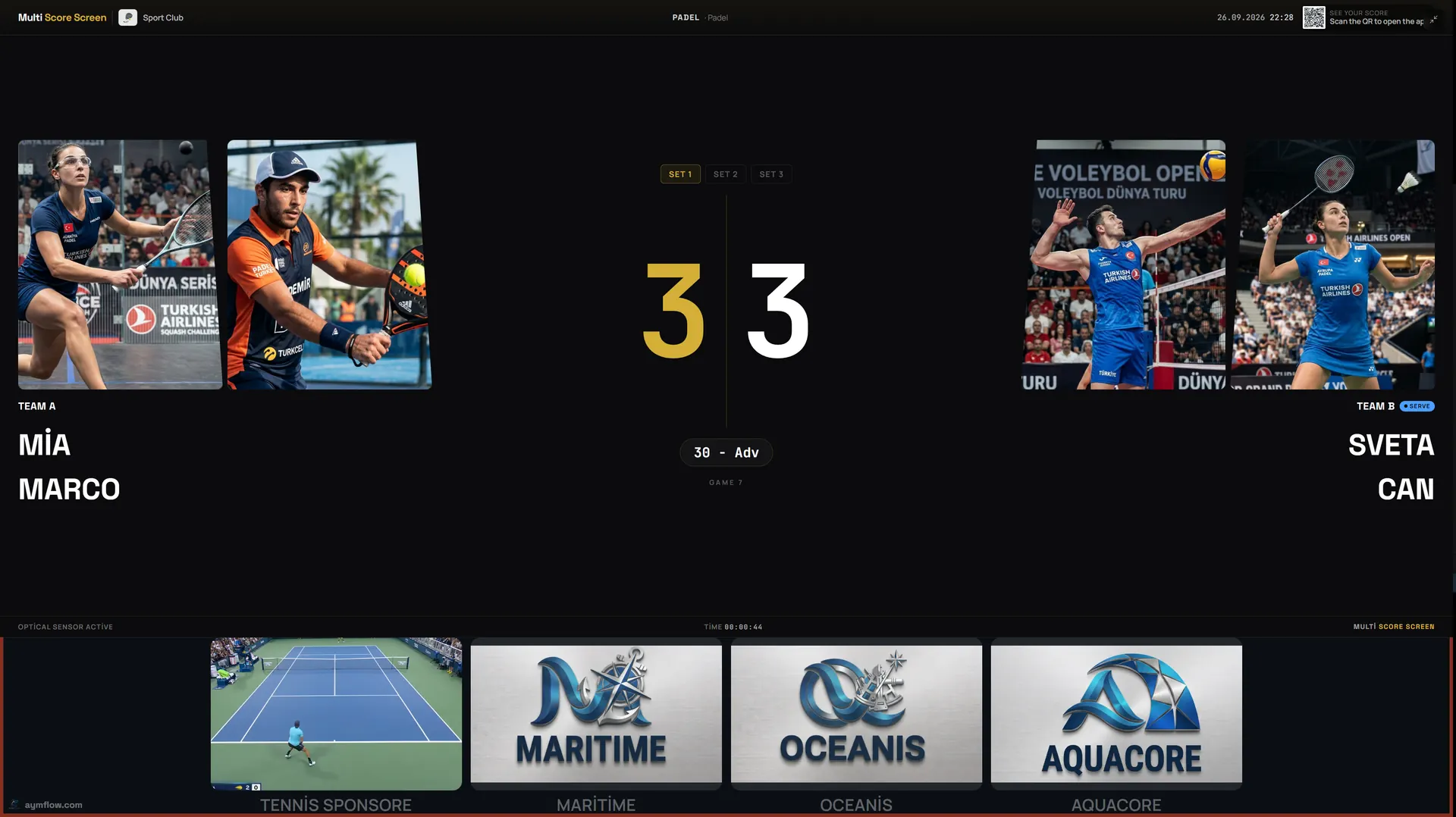
Padel borrows its scoring from tennis, so the screen has three layers to show at once: the points in the current game, the games in the current set, and the sets already played. On a Multi Score Screen padel scoreboard, each pair has its own row with both player names and photos, the finished sets sit next to the names, and the current game score is shown large enough to read from the back glass. A serve indicator marks which pair is serving, so nobody has to remember who served the last game.
The screenshot at the top of this guide is a real example: a doubles match level at 3-3 in the first set, with the game at 30-Adv. Spectators walking past can see in one look that this is a key point.
Golden point, advantage and Star Point
Deuce is where padel scoring causes the most confusion, because clubs and competitions do not all play it the same way:
- Advantage scoring: at 40-40 a pair must win two points in a row, as in tennis. Games can run long.
- Golden point: at 40-40 one deciding point is played and the receiving pair chooses which side receives. Many clubs use it to keep court bookings on time.
- Star Point: a format introduced by the International Padel Federation in which the first deuces are played with advantage, and if the game keeps returning to deuce a single deciding point ends it.
Multi Score Screen supports both golden point and standard advantage scoring for padel, so the scoreboard follows whichever format a match is played under. For players, the benefit is simple: when the screen shows 40-40, everyone already knows whether the next point decides the game.
Tiebreaks and match tiebreaks
At 6-6 a tiebreak is played: points are counted 1, 2, 3 and the first pair to seven with a two-point lead wins the set. In many amateur leagues and social tournaments the third set is replaced by a match tiebreak, usually played to ten. These are exactly the moments when players lose count, especially with the change of ends and the serve rotation every two points. A digital padel scoreboard keeps the tiebreak count on the TV, so the only thing players need to think about is the next ball.
Setting up a padel scoreboard on your court TV
Multi Score Screen runs on the TV or display a court already has, so there is no dedicated scoreboard hardware to buy or mount. The TV needs a Wi-Fi or internet connection and either a streaming app or an HDMI input; the scorer only needs a phone. A typical setup looks like this:
- Create your club account and follow the built-in setup checklist.
- Add the court and choose padel as its sport.
- Pick the court mode (rental, lesson or tournament), the rental duration and the cancellation notice.
- Activate the license with the key you receive by email for that court.
- Open the scoreboard on the court TV and choose a screen theme.
- Play a test point from a phone and check that the TV updates.
Most clubs have their first court live the same day they sign up. For a more detailed walkthrough, including what to check on the TV before you start, see our TV scoreboard setup guide.
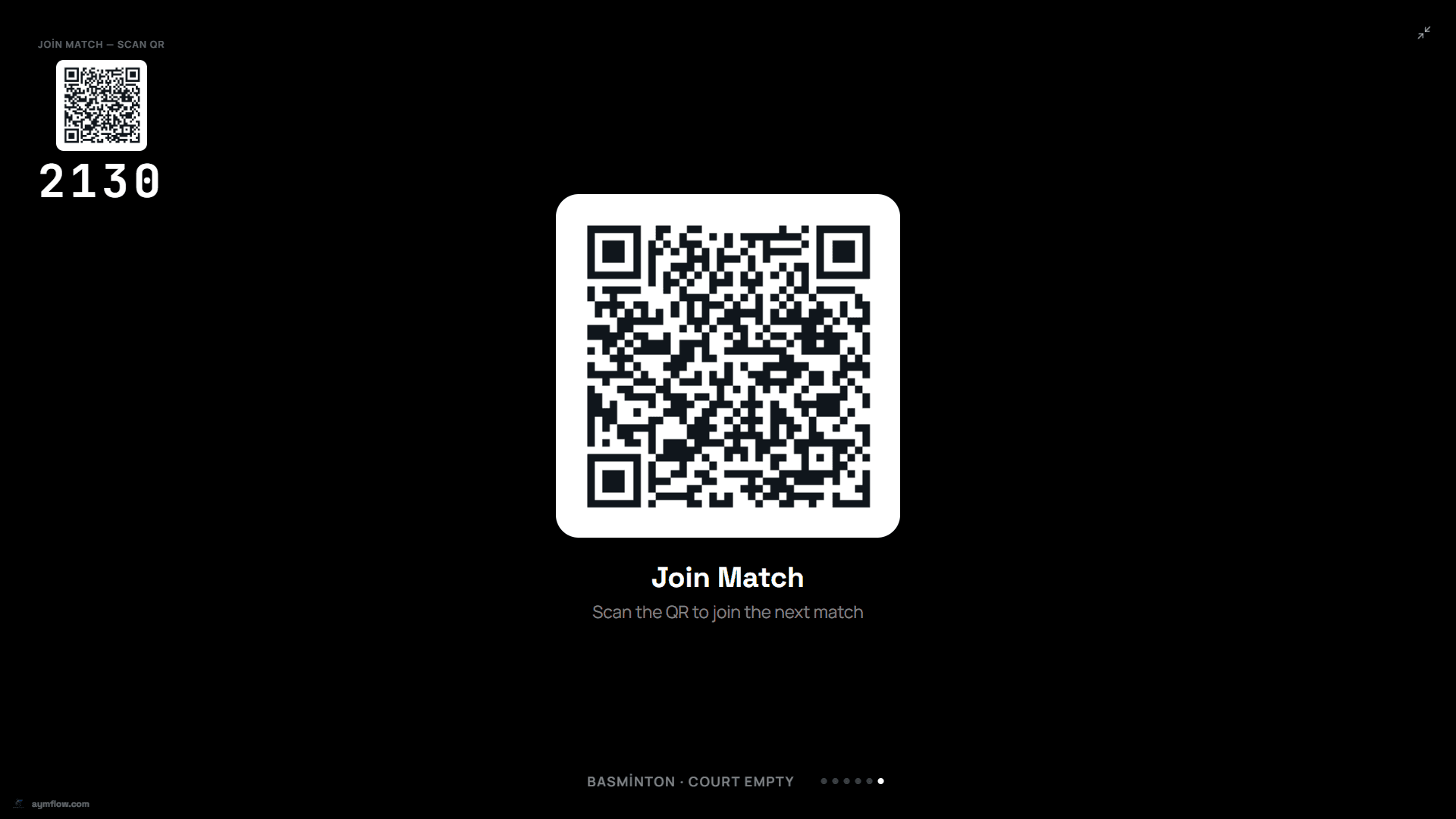
When a court is configured, a join QR code and a PIN are generated automatically. They appear on the court TV and refresh after every match, so the next pair can scan, enter the PIN and join their own match.
Who keeps the score: players or a referee
In most club matches the players keep score themselves, from a phone. For competitive matches, finals or televised courts, referee mode turns a phone into the match console: a referee, coach or staff member adds a point, takes one back or sets the server, and the TV follows instantly. It is the official score, entered by hand, and it needs no sensors.
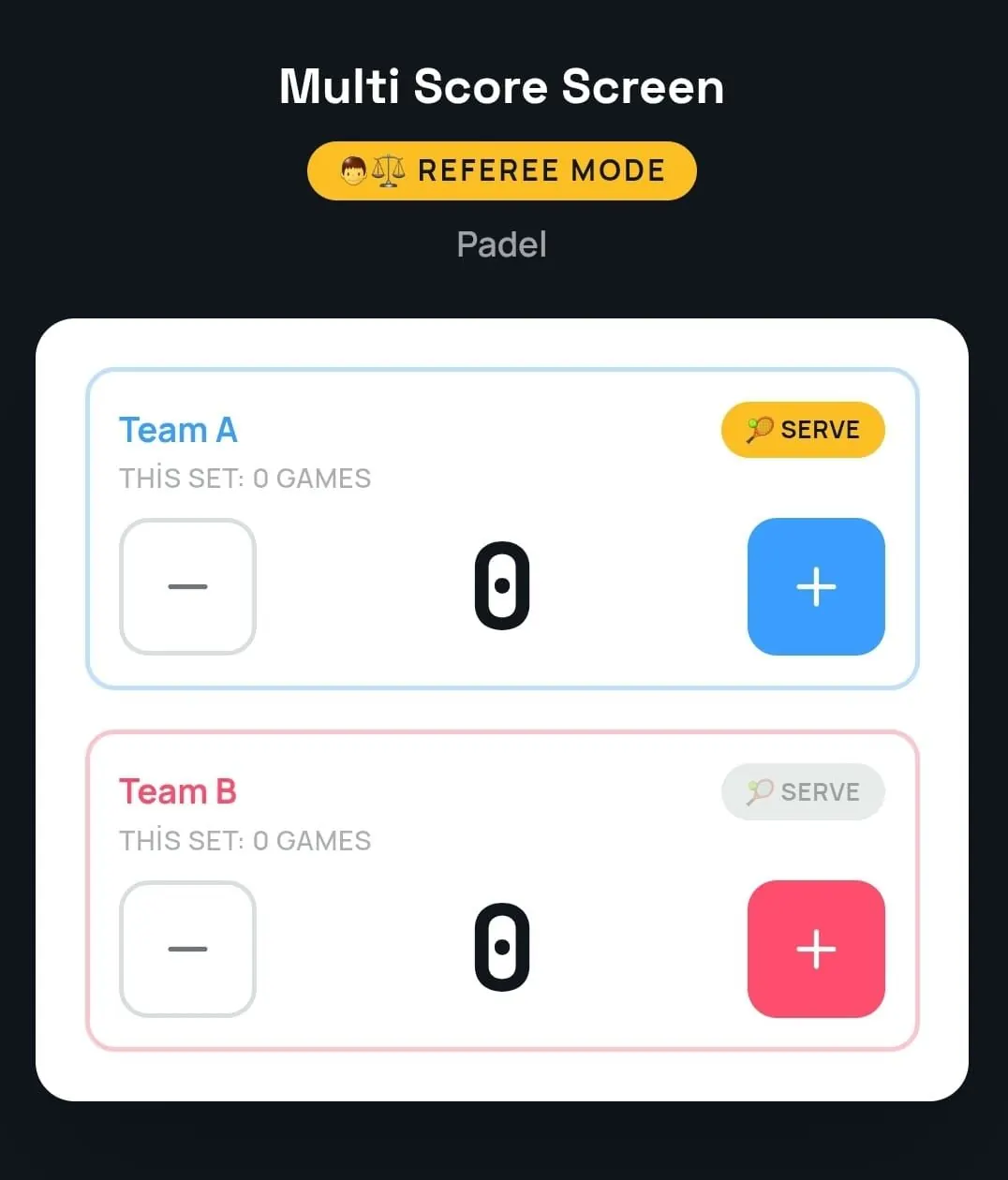
Mistakes happen in fast exchanges. Point and game undo fixes a mis-tap without restarting the match or losing the rest of the score, and if the venue's Wi-Fi drops for a moment, scoring keeps working and syncs once the connection is back.
Screen themes for padel clubs
Every court TV can wear its own look while the live score stays the same. Platinum is minimal and metallic, made for modern clubs; Classic puts each pair in a bold row with the game score in large color blocks that are easy to read from the far end; Gold adds gold and silver numerals and a match clock, a good fit for finals and the showcase court; Broadcast uses a TV-style layout with large player photos on each side.
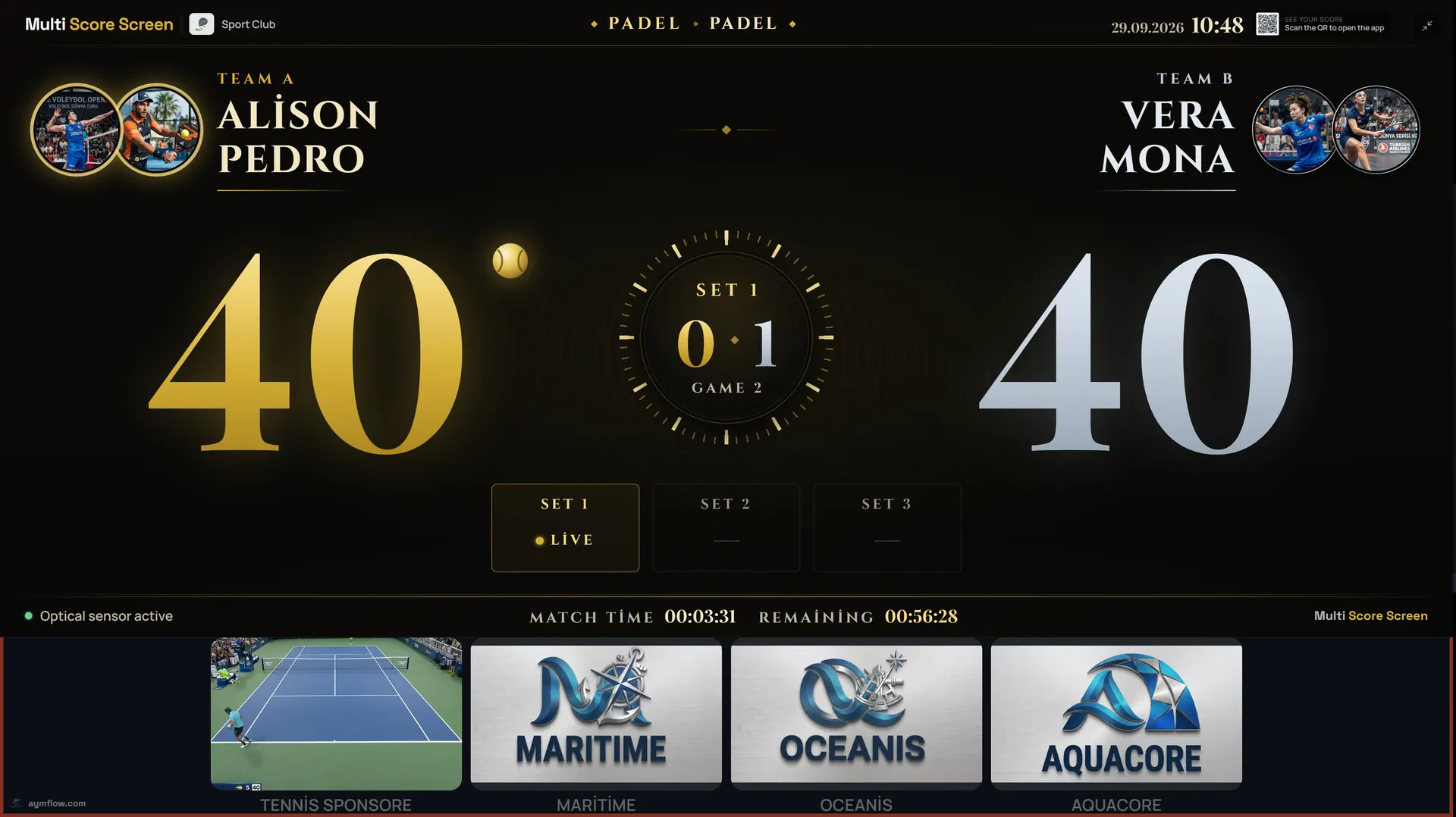
When the match ends, a winner screen shows the final set scores before the court resets for the next booking. On the Pro, Elite and Unlimited plans you can also set custom team names and colors, and Elite and Unlimited offer white-label branding.
Live scores on every phone
Not everyone can stand at the glass. A quick QR scan opens a live link to the match in the mobile browser, with no app to install, so friends at the bar, parents in the car park or a tournament director on another court can follow the score. Player names and photos used for a match are temporary and are removed when the match ends.
League nights and tournaments across several courts
A padel club rarely runs one match at a time. With tournament mode, organizers run round-robin or knockout brackets across multiple courts from one dashboard, and each court's TV shows its own live match. The Court Status Board shows at a glance which courts are empty, occupied or reserved, which helps the desk keep a busy evening on schedule.
Clubs that also offer other sports run them from the same account: a court can be a padel scoreboard tonight and the same system scores tennis or pickleball on the courts next door. Our guides to the tennis scoreboard and the pickleball scoreboard explain how those sports appear on screen.
What a padel club gets out of a scoreboard
- Fewer disputes: the score is on the wall, not in four players' memories.
- Bookings that end on time: golden point and a visible score keep games from dragging.
- A better show for spectators: the score is readable from the stands and on every phone.
- Sponsor visibility: sponsor logos sit in a strip beneath the live score, and between matches the TV rotates full-screen sponsor ads with the join QR code.
- Useful numbers: statistics show reservation counts and occupancy by sport, with a one-click CSV export.
Choosing a plan for your padel courts
Plans are licensed per court and every plan runs on the TV the court already owns. Starter ($44/month or $528/year) covers one court and one sport, which suits a single padel court. Pro ($134/month or $1,608/year) covers up to five courts with all eight sports, and Elite ($224/month or $2,688/year) covers up to ten courts with white-label branding and dedicated onboarding. Unlimited is a lifetime license at $1,299 per court, with optical sensors included and software updates not included. Compare the details on the pricing page.
In-depth padel scoreboard guides
Each part of running a padel scoreboard has its own guide:
- Running leagues and events across courts: padel tournament scoreboard
- Selling the screen to local businesses: padel scoreboard sponsorship
- Scoring from a phone with the QR code, PIN and referee mode: padel scoreboard app
- Keeping court TVs connected in a glass-and-steel hall: Wi-Fi for a padel scoreboard
- Placing the screen on outdoor, covered and indoor courts: outdoor padel court scoreboard
- Flip cards and counters compared with a court TV: digital vs manual padel scoreboard
- What to check before you buy: padel scoreboard buying guide
- Choosing a theme for each court: padel scoreboard themes
- Fixing common problems on court: padel scoreboard problems and fixes
Frequently asked questions
What is the best padel scoreboard for a club?
Look for a padel scoreboard that players can read from anywhere on the court, that follows padel rules such as golden point and tiebreaks without workarounds, and that staff can run from a phone. Multi Score Screen does all three on the TV a club already has, so there is no scoreboard hardware to buy, and the same login can also run a padbol scoreboard on other courts.
Can a normal TV be used as a padel scoreboard?
Yes. Multi Score Screen runs on the TV or display a court already has. The TV needs an internet connection and either a streaming app or an HDMI input, and the score is controlled from a phone.
Does the scoreboard support golden point?
Yes. Padel matches can be scored with golden point or with standard advantage scoring, so the screen follows the format your club or competition plays.
Do we need sensors on the court?
No. In referee mode a person enters every point by hand from a phone, so a court that uses referee mode does not need sensors. Optical sensors are a separate feature that detects points automatically.
Can spectators follow the match without being at the court?
Yes. Scanning the QR code opens a live link to the match in any mobile browser, with no app download required.
How long does it take to get a padel court live?
Most clubs have their first court running the same day they sign up, with no installation appointment and no separate staff training.
Want to see it on your own courts? Request a demo and we will walk you through a live padel match on the TV you already have.
Explore the Multi Score Screen digital scoreboard for padel, tennis, pickleball and 5 more sports →